Rviz Navigation Plugin
This plugin is only compatible with ROS1 version.
Marker Setting

To set the size of the markers for target points, you can adjust the marker scale factor (1.0 is the default value). Remember to click "SET" to refresh all the markers.
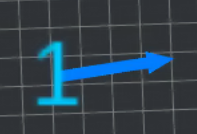
The marker consists of two parts: the numerical part represents the sequence number of the target point, an d the arrow part indicates the stopping direction of the target point.
Add Goal
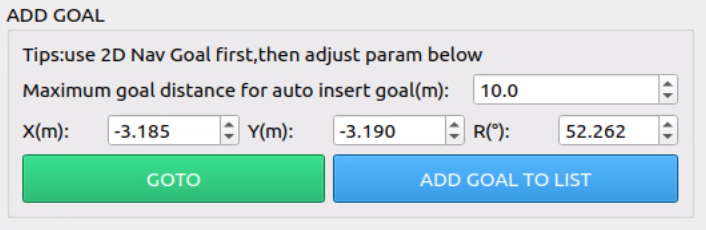
- Please use the built-in functionality of Rviz (
 ) to select the goal point on the map.
 - You can fine-tune the coordinate position by entering the X, Y, and R values.
- If you need to go directly to the goal point, click on the GOTO button.
- If you need to add a goal to the goal list, click on the ADD GOAL TO LIST button.
- If the current goal and the previous goal on the goal list are too far, an intermediate goal point will be automatically inserted in the list. The maximum allowable deviation distance can be modified in the interface shown above, with the default being 10 meters.
Goal List Management
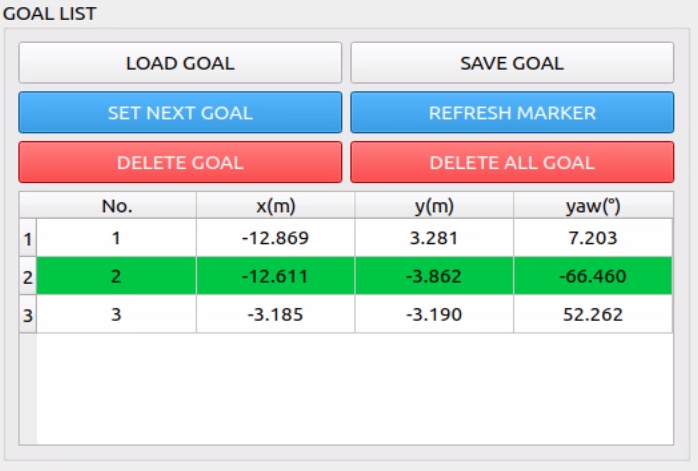
- The added goal points will be displayed in this list, and the parameters in the list can be directly edited. After editing, click the "REFRESH MARKER" button to update all markers.
- The green rows in the list represent the next goal to be executed. To switch to the next goal, select the corresponding row in the list and click the "SET NEXT GOAL" button.
- The "LOAD GOAL" and "SAVE GOAL" buttons are used to save and load the list. The list will be saved in ini/memory.txt and can be directly modified in the document.
- To delete a single goal, select the corresponding row and click the "DELETE GOAL" button.
- To clear the list of goals, click the "DELETE ALL GOAL" button.
Mode Setting
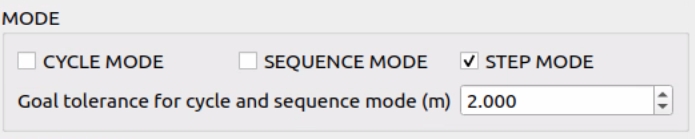
This is used to set execution mode for goal points in the list.
| cycle mode | After executing the last goal point, the system will continue to execute the first goal point. |
| sequence mode | After executing all goal points in the list, the system will stop. |
| step mode | Goals will be executed one by one in the listed order. |
To smooth the path, you can adjust the Goal Tolerance setting. Once the robot enters the radius of this distance from the target point, it will automatically move to the next target point. The smaller the environment, the smaller this value needs to be. This setting does not affect the arrival at the final destination point.
Start Control
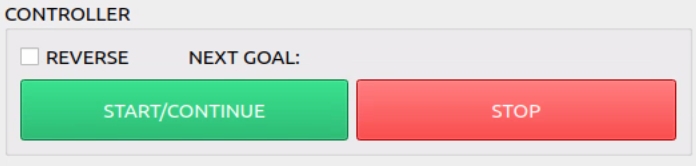
- By default, the list executes the target points from top to bottom. If REVERSE is selected, the target points are executed in reverse order.
- Due to system issues, multiple clicks may be required when using the START and STOP buttons. This control button only affects the goal points in the list. After starting, information about the next goal point will be displayed in the NEXT GOAL.