# CAN协议构架说明

<span class="fontstyle0">XSTD是一套基于CAN网络，可扩展到ROS使用的通讯协议规范。该规范为支持多设备和模组设计，在保持简洁易懂的同时提供给各模组充分的拓展空间，并支持多个同种设备同时在线工作。协议对同类型设备采用统一规范，牺牲少量效率换来极大的便捷性，非常便于早期功能开发与学习。</span>

---

#### 1.设备状态定义

##### <span class="fontstyle0" style="color: rgb(53, 152, 219);">使能（通讯设备默认状态）</span>

<span class="fontstyle0">▪设备所有功能正常运行。  
▪对CAN和COM指令做出反馈。  
▪默认关闭次要反馈，可通过指令开启。  
</span>

##### <span class="fontstyle0" style="color: rgb(53, 152, 219);">失能（普通设备默认状态）</span>

<span class="fontstyle0">▪设备进入通讯静默状态，内部任然运行。  
<span style="color: rgb(224, 62, 45);">▪只接受通用指令，不接受专用指令。</span>  
▪只发送心跳反馈和通用指令的反馈，不发送专用指令反馈。  
▪射频遥控器等设备自身安装的控制设备任然有效，并拥有更高优先级。</span>

---

#### <span class="fontstyle0">2.设备的分类与识别</span>   


##### <span class="fontstyle0" style="color: rgb(53, 152, 219);">每个设备有三个主要识别属性：大类、型号、编号</span>

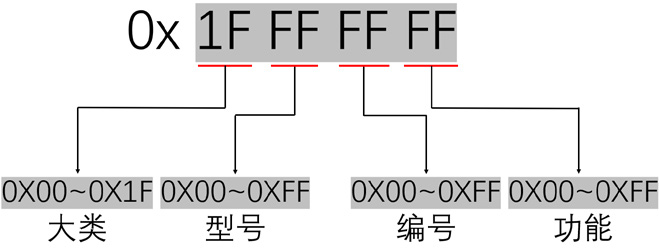
<span class="fontstyle0">▪大类是按设备类型共分为30类，编码从0x01~0x1E，0x1F作为广播编码 。  
▪型号是从0x01~0xFE的序号，在同一大类中，型号是确定且唯一的，与设备名称绑定的，0xFF</span><span class="fontstyle0">下</span><span class="fontstyle0">作为广播编码。  
▪编号是从0x01~0xFE的序号，可以在XVIEW上设置，用于区分同大类且同型号的设备，0xFF作</span><span class="fontstyle0">下</span><span class="fontstyle0">为广播编码。  
</span>

<p class="callout info"><span class="fontstyle0">在使用指令时，需要对应的大类、型号、编号，对应的大类与型号代码请在对应设备的用户手册中查询。</span>   
</p>

---

#### <span class="fontstyle0">3.指令类型   
</span>

##### <span class="fontstyle0"><span style="color: rgb(53, 152, 219);">指令分为通用指令和专用指令 </span>  
</span>

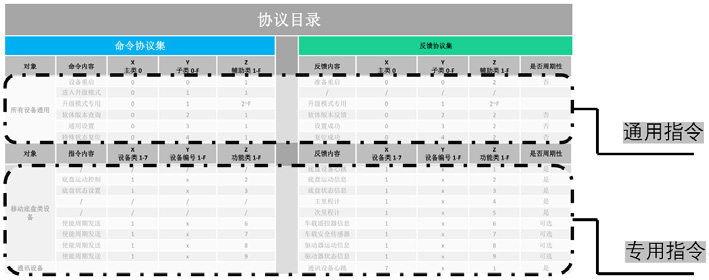
<span class="fontstyle0"><span style="color: rgb(53, 152, 219);"><span style="color: rgb(0, 0, 0);"><span style="color: rgb(53, 152, 219);"><span style="color: rgb(0, 0, 0);">▪</span></span>通用指令只通过CAN ID区分接受设备，数据内容对所有大类都是相同的，主要用于基础功能下设置和反馈</span>  
<span style="color: rgb(0, 0, 0);">▪专用指令是按大类区分，每个大类的功能是不同的，同个大类中功能按需取用</span>  
<span style="color: rgb(0, 0, 0);">▪通用指令的功能编码从0x 01开始，对应反馈从 0x A1开始（心跳包反馈为0x B0）</span>  
<span style="color: rgb(0, 0, 0);">▪专用指令的功能编码从0x 11开始，对应反馈从 0x B1开始 </span>  
</span></span>

[![微信截图_20240722174441.png](https://odocs.hexfellow.com/uploads/images/gallery/2024-07/scaled-1680-/uru7UMGF8Um9UCvP-20240722174441.png)](https://odocs.hexfellow.com/uploads/images/gallery/2024-07/uru7UMGF8Um9UCvP-20240722174441.png)

---

#### <span class="fontstyle0">4.CAN数据结构   
</span>

<p class="callout info"><span class="fontstyle0">产品中CAN通讯采用CAN2.0B（扩展帧），通讯波特率为500K。  
</span></p>

<span class="fontstyle0">CAN ID 编码规范：   
</span>

![image.png](https://odocs.hexfellow.com/uploads/images/gallery/2024-07/scaled-1680-/ThSdfPyNbQv07JOp-image.png)

<span class="fontstyle0">CAN 数据位：Byte\[0\]~Byte\[7\]：</span>

![image.png](https://odocs.hexfellow.com/uploads/images/gallery/2024-07/scaled-1680-/utAMf3FTjkMBWTCC-image.png)

<span class="fontstyle0">CAN使用的CAN信息为上述提到的CANID与CAN\_DATA，总计12个字节数据。使用时，针对不同CANID进行相应的CAN\_DATA数据传输。</span>

<span class="fontstyle0">CANID中大类与型号是设备的固定参数，数值不会改变，编号默认为1，当有多个同类设备同时使用时，可以通过通用指令修改。</span>

<table class="NormalTable" id="bkmrk-%C2%A0can%E6%95%B0%E6%8D%AE%E5%B8%A7-%E6%95%B0%E6%8D%AE%E5%AE%9A%E4%B9%89-id%5B0%5D-i" style="width: 100.64%; height: 119.188px;"><tbody><tr style="height: 29.7969px;"><td colspan="6" style="background: rgb(189, 214, 238); height: 29.7969px; width: 100%;"> <span class="fontstyle0">CAN数据帧</span>

</td></tr><tr style="height: 29.7969px;"><td style="background: rgb(189, 214, 238); height: 29.7969px; width: 16.6667%;">数据定义

</td><td style="background: rgb(222, 234, 246); height: 29.7969px; width: 16.6667%;">ID\[0\]

</td><td style="background: rgb(222, 234, 246); height: 29.7969px; width: 16.6667%;">ID\[1\]

</td><td style="background: rgb(222, 234, 246); height: 29.7969px; width: 16.6667%;">ID\[2\]

</td><td style="background: rgb(222, 234, 246); height: 29.7969px; width: 16.6667%;">ID\[3\]

</td><td style="background: rgb(222, 234, 246); height: 29.7969px; width: 16.6667%;">DATA \[4~11\]

</td></tr><tr style="height: 29.7969px;"><td style="background: rgb(189, 214, 238); height: 29.7969px; width: 16.6667%;">数据类型

</td><td style="background: rgb(222, 234, 246); height: 29.7969px; width: 16.6667%;">unsigned int8

</td><td style="background: rgb(222, 234, 246); height: 29.7969px; width: 16.6667%;">unsigned int8

</td><td style="background: rgb(222, 234, 246); height: 29.7969px; width: 16.6667%;">unsigned int8

</td><td style="background: rgb(222, 234, 246); height: 29.7969px; width: 16.6667%;">unsigned int8

</td><td style="background: rgb(222, 234, 246); height: 29.7969px; width: 16.6667%;">0~8 x unsigned int8

</td></tr><tr style="height: 29.7969px;"><td style="background: rgb(189, 214, 238); height: 29.7969px; width: 16.6667%;">说明

</td><td style="background: rgb(222, 234, 246); height: 29.7969px; width: 16.6667%;">设备大类

</td><td style="background: rgb(222, 234, 246); height: 29.7969px; width: 16.6667%;">设备型号

</td><td style="background: rgb(222, 234, 246); height: 29.7969px; width: 16.6667%;">设备编号

</td><td style="background: rgb(222, 234, 246); height: 29.7969px; width: 16.6667%;">设备功能

</td><td style="background: rgb(222, 234, 246); height: 29.7969px; width: 16.6667%;">0~8字节数据

</td></tr></tbody></table>

---

#### <span class="fontstyle0">5.指令集查询说明 </span>

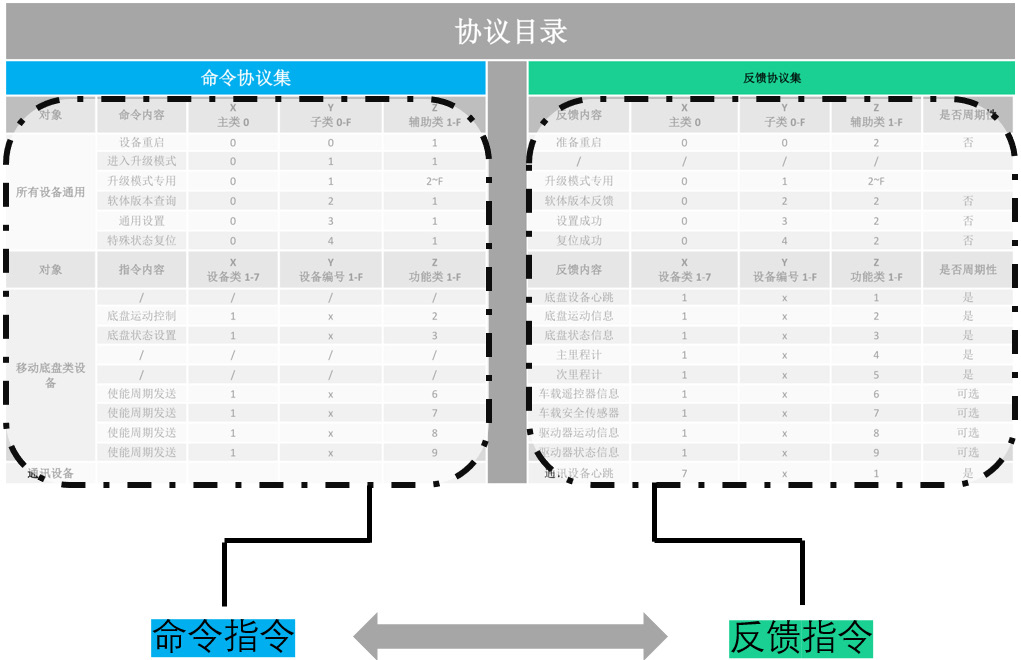
<span class="fontstyle0">CAN协议分为设备通用指令与设备专用指令。通用指令操作对系统所有模块配件均适用，常见用于设备启动，系统升级，版本查询，系统复位等；设备专用指令专属于不同设备模块，不同模块根据需要选择使用部分专用指令，对特殊设备可定制专用指令。 </span>

![image.png](https://odocs.hexfellow.com/uploads/images/gallery/2024-07/scaled-1680-/7LLe7dnekPSE95Ax-image.png)

<span class="fontstyle0">CAN闭环控制系统，对绝大数指令均有应答机制。即命令帧,反馈帧一一对应。根据反馈帧实时监控数据流准确性。对部分功能可能需要先使能反馈或设置反馈周期。</span>

![image.png](https://odocs.hexfellow.com/uploads/images/gallery/2024-07/scaled-1680-/qqi0OH5nVjZfc2ns-image.png)

<span class="fontstyle0">  
</span>

---

#### <span class="fontstyle0">6.CAN分析仪</span>

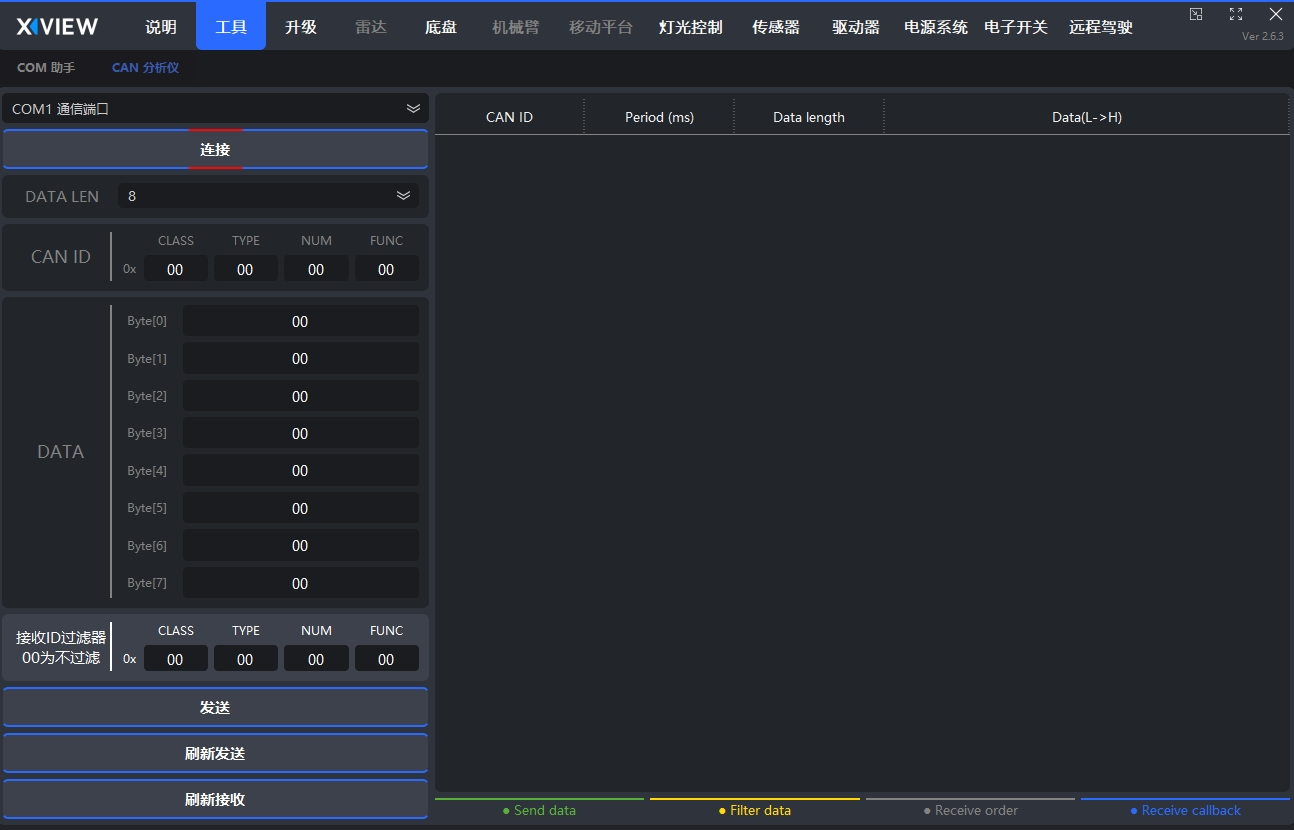
<span class="fontstyle0">如果有使用CAN-COM HUB或WiFi HUB,可以使用XVIEW的CAN分析仪功能来测试</span>

[![微信截图_20240723010211.png](https://odocs.hexfellow.com/uploads/images/gallery/2024-07/scaled-1680-/AD66PyHi5ofJojus-20240723010211.png)](https://odocs.hexfellow.com/uploads/images/gallery/2024-07/AD66PyHi5ofJojus-20240723010211.png)